
Multi-Location Stock: Track B2B Inventory Across Every Location
Multi-location stock lets B2B and wholesale businesses track inventory for every product across every warehouse, shop, and partner. See how Turis handles per-location levels, reservations, backorders, incoming stock, consignment, and ERP sync.
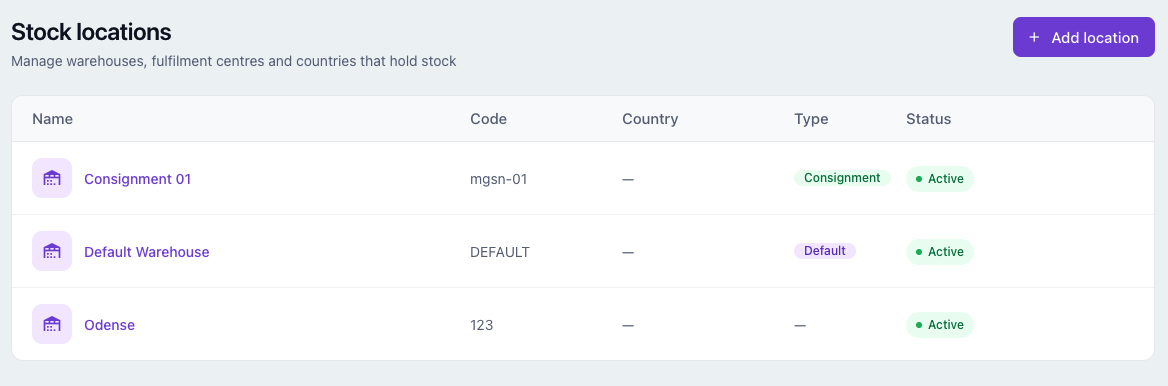
Multi-location stock is here. If you run a B2B or wholesale operation, you can now track inventory for every product across every place you hold it in Turis: warehouses, retail shops, drop-ship partners, and consignment locations. Turis shows each customer what is genuinely available to them, reserves and releases stock automatically as orders move through their statuses, and keeps a full, auditable history of every movement.
For years, inventory in most systems lived in a single field called stock. One number. It could tell you that you had 47 units of something, but not where those units were, who they were promised to, or when more were arriving. Multi-location stock replaces that single number with a model that matches how wholesale businesses actually run.
What is multi-location inventory management?
Multi-location inventory management is the practice of tracking stock levels separately for each physical or logical location a business holds goods in, instead of as one combined total. For a wholesaler or B2B brand, that usually means several warehouses, a few shops, drop-ship suppliers, and stock held by customers on consignment. Each location carries its own on-hand, reserved, incoming, and available quantities, and every order draws from the right one.
Track stock across unlimited locations
You are no longer limited to a single pile of stock. Create as many stock locations as you operate, each with its own name, code, and address. Every product knows exactly how much it has in each place, not just “somewhere.”
Before: “We have 47.” Now: “We have 30 in Odense, 12 in Aarhus, and 5 on the way.” That precision is the difference between a confident promise date and a guess.
A complete, auditable stock ledger
Under the hood, stock is now a proper ledger. Every change, whether a sale, a return, a manual correction, or an integration sync, is recorded as a movement you can scroll back through in the stock log. Instead of wondering why a level reads 47, you get a receipt for every unit in and out, and you can recompute current levels directly from history whenever you need to reconcile.
Reserved, consumed, released: stock that reflects order status
The old single field could not tell the difference between stock that was spoken for and stock that was genuinely gone. The new model can. Stock is reserved when an order comes in, consumed when it ships, and released back to availability if an order is cancelled or trimmed.
You define the rules. The Stock Rules engine maps each order status to what should happen to stock: reserve, consume, release, restock, or nothing at all. It handles orders that bounce back and forth between statuses without ever double-counting, so you configure it once and trust it from then on.
Sell incoming stock and manage backorders
With incoming batches, you log shipments that are on the way along with their expected arrival dates. That turns an empty shelf into a sellable promise. Once incoming stock is recorded, you can:
- let customers order up to available plus incoming, with a ceiling so you never oversell;
- show buyers a clear expected arrival date directly on the product page;
- and match backorders automatically to the next incoming batch, oldest first.
Your “out of stock” becomes “back on [date],” which keeps demand from leaking to a competitor.
Location-aware availability for every customer
Stock is now location-aware for buyers, not just for your back office. Pin a location to a product, to an individual customer, or to a whole customer group with priorities, and each buyer sees availability for their resolved location. Because this runs straight through search, the storefront only surfaces what that customer can actually order and receive.
Consignment inventory, built in
If you have customers holding your stock on consignment, it is now a first-class flow rather than a spreadsheet on the side. Assign a customer their consignment location, and when their orders are fulfilled the stock moves into that location automatically, with its own stock rules column and a badge so you always know which locations are consignment.
Transfers, per-line locations, and bulk updates
- Transfer stock between locations in a couple of clicks, with the movement recorded on both sides.
- Change the location on an individual order line, and the stock reserves or restocks in the right place automatically.
- Bulk upload stock per location, appending to or overwriting existing levels.
A public API for ERP and WMS sync
There is a fresh public API built for the multi-location world. List your locations, page through every product’s per-location levels (on-hand, reserved, incoming, and available), and pull only what has changed since your last sync. To push stock back in, a single endpoint sets levels per product and location. That makes it straightforward to keep your ERP or WMS and Turis in lockstep without nightly full exports.
Backwards compatible with your existing setup
Worried about the humble stock field you already rely on? It stays exactly where it is. For backwards compatibility, it now quietly reports your default location, so there is nothing to migrate by hand and nothing to break. Existing integrations keep running while you adopt locations at your own pace.
Multi-location stock at a glance
| Then | Now |
|---|---|
| One number | Many locations |
| Stock simply “decremented” | Reserved, consumed, and released by your rules |
| No history | A full, auditable stock ledger |
| Out of stock was a dead end | Sell up to incoming, with arrival dates |
| Everyone saw the same number | Each customer sees their location’s stock |
| Manual workarounds | Consignment, transfers, per-line locations, public API |
Frequently asked questions
What is multi-location inventory management?
Multi-location inventory management is the practice of tracking stock levels separately for each place a business holds goods, rather than as one combined total. In Turis, every product has its own on-hand, reserved, incoming, and available quantities at each location, and orders draw stock from the correct one.
Can each customer see stock for their own location?
Yes. You can pin a location to a product, to an individual customer, or to a whole customer group with priorities. Each buyer sees availability for their resolved location, and the storefront search only shows what they can actually get.
How does Turis handle backorders and incoming stock?
You can log incoming batches with expected arrival dates. Customers can then order up to available plus incoming, with a ceiling so you never oversell, and backorders are matched automatically to the next incoming batch, oldest first. Buyers see an expected arrival date on the product.
Does multi-location stock work with my ERP or WMS?
Yes. A public API lets you list locations, page through every product’s per-location levels (on-hand, reserved, incoming, available), and pull only what has changed since your last sync. A single endpoint sets levels per product and location, so your ERP or WMS and Turis stay in lockstep.
Will my existing stock setup still work?
Yes. The original single stock field remains for backwards compatibility and simply reports your default location now. Nothing needs to be migrated by hand, and existing integrations keep working.
What is consignment inventory in Turis?
Consignment inventory is stock your customer holds on your behalf. In Turis you assign a customer a consignment location, and when their orders are fulfilled the stock moves into that location automatically, with its own stock rules and a badge that marks which locations are consignment.
One field carried Turis inventory for a long time, and it earned its rest. From field to feature, your stock just grew up. If you are ready to track B2B inventory across every location, explore the Turis platform or talk to the team about multi-location stock.
