Stock ManagementPart of the Turis B2B commerce platform

Inventory that keeps up with your orders, across every warehouse, every market, every channel.

Turis tracks stock as a ledger of movements across every location, so your levels stay accurate, every change is explainable, and your storefront only sells what you can actually deliver.
The idea

From a stock number to a stock system.

Most B2B platforms store one stock number and hope it’s right. Turis keeps a ledger. Every reservation, sale, transfer, delivery, and correction is a movement, and your current levels are always derived from that history.

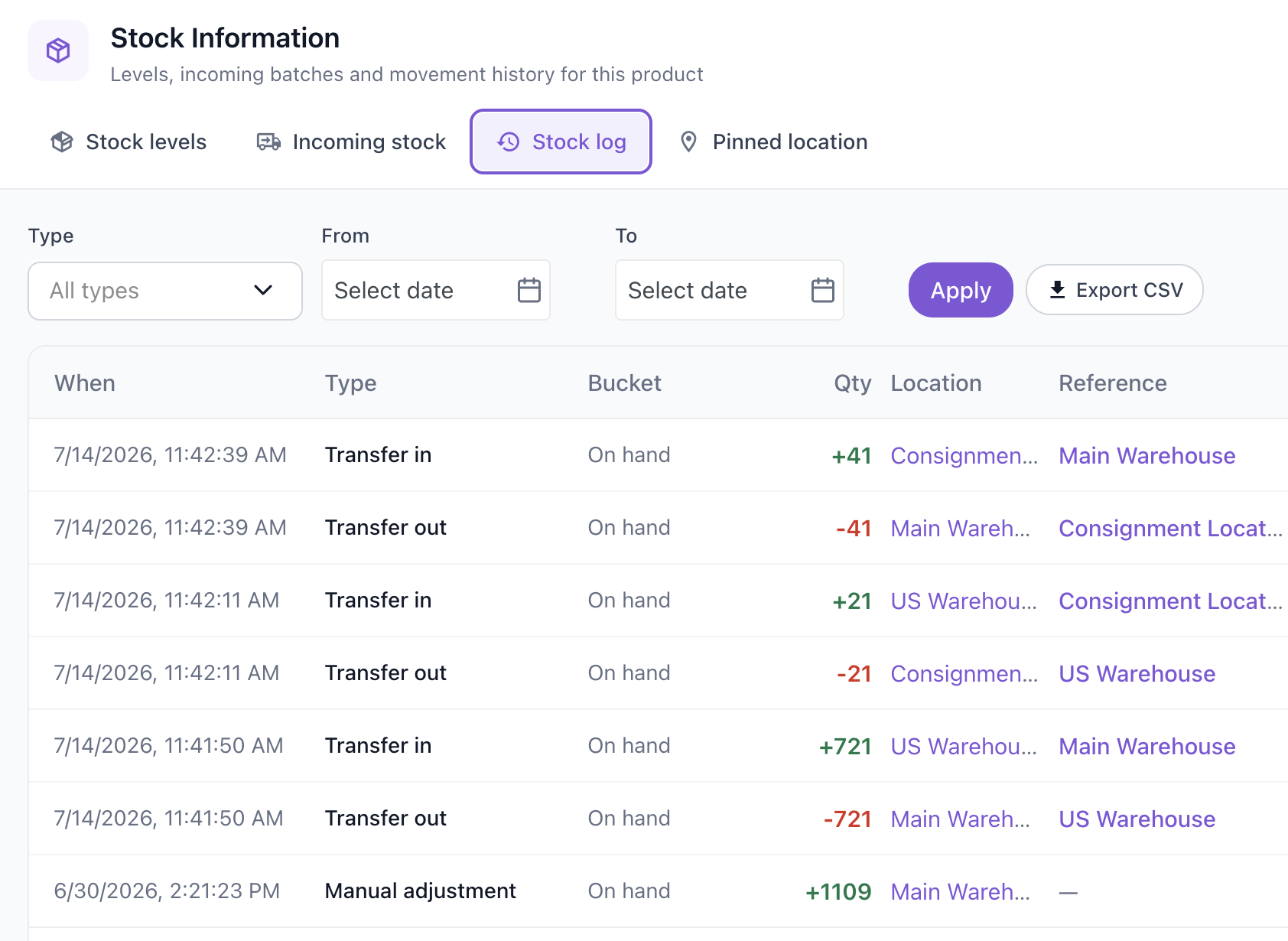
That is why the numbers are trustworthy, and why every change is explainable. When a figure looks off, you don’t guess. You open the stock log and see exactly what happened, when, where, and who did it.

Stock log
Turis stock log — movement history showing transfers in and out and a manual adjustment, with when, type, bucket, quantity, location, and reference, plus a CSV export button

Multi-location

Stock, per warehouse and per buyer.

Run as many stock locations as your operation needs, and let each buyer see the availability that is actually relevant to them.

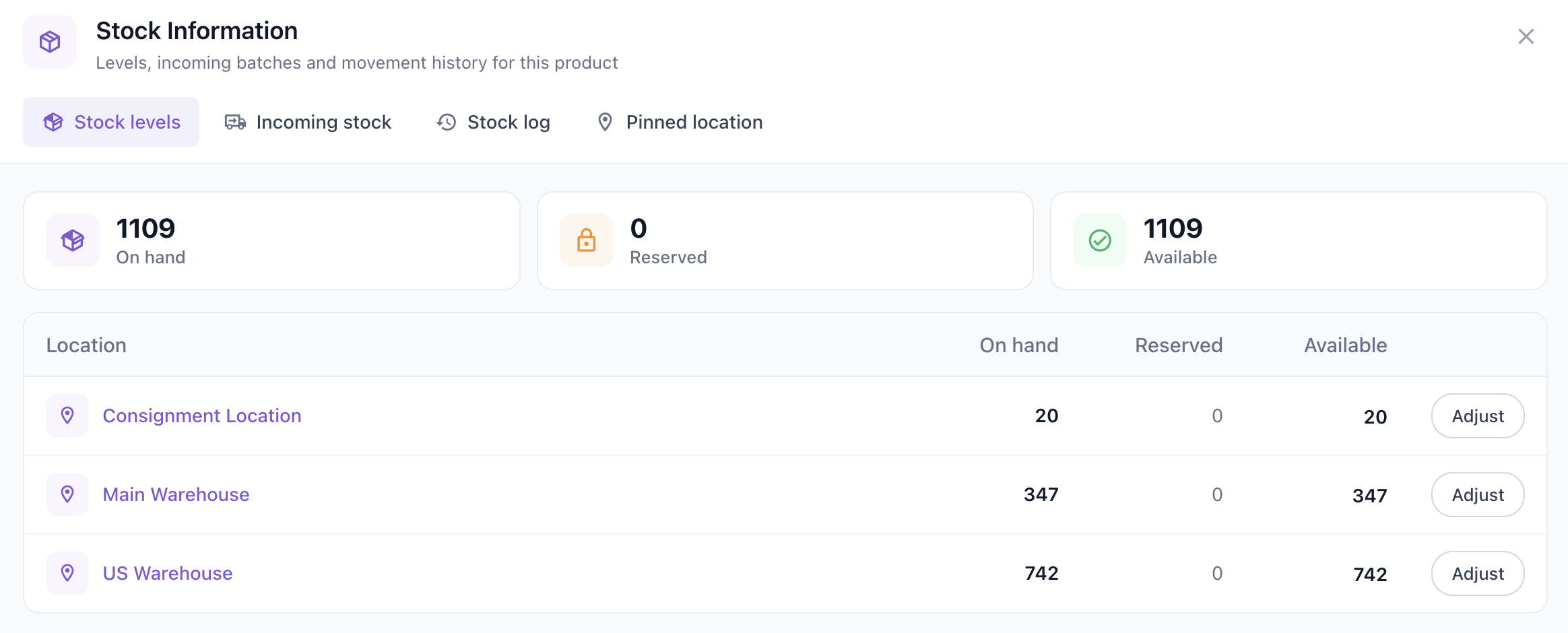
  • Unlimited stock locations, each tracking on hand, reserved, and available per product.
  • Location pinning: assign customers, groups, or products to a warehouse, and buyers automatically see availability and search results from their own location.
  • Consignment stock with a lifecycle driven by your order statuses, plus atomic, logged transfers between locations.
Stock levels
Turis stock levels — on hand, reserved, and available totals with a per-location breakdown across a consignment location, main warehouse, and US warehouse

Three numbers

On hand, reserved, available.

Every product carries three numbers, kept in step automatically. It is how Turis prevents overselling at checkout.

  • Ordering reserves or consumes stock instantly. Cancel or edit an order and it is released. No double-counting.
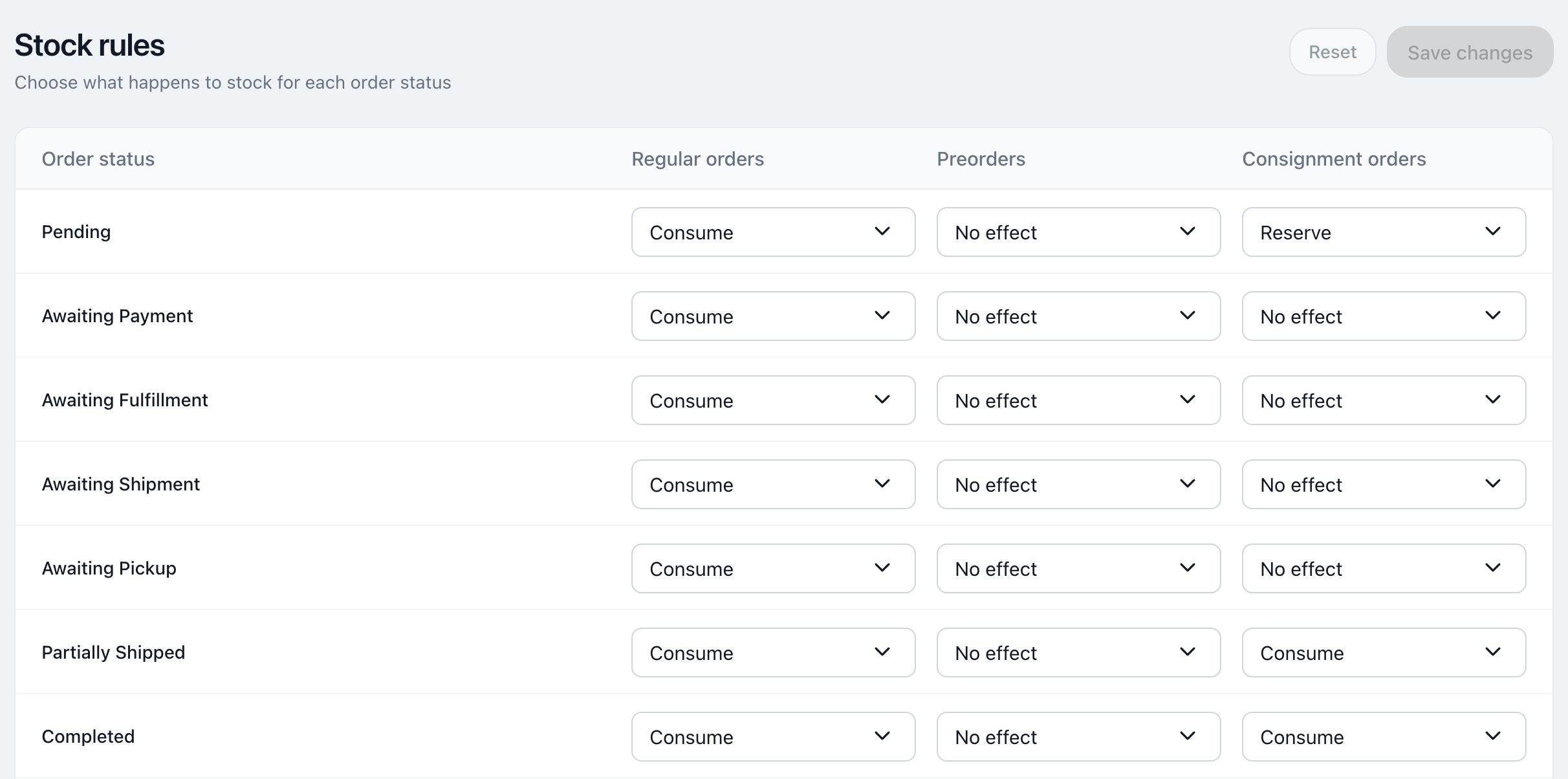
  • Stock rules let you decide what each order status does to stock: reserve, deduct, release, or restock.
  • Separate rule sets for regular, preorder, and consignment orders, so each flow behaves the way it should.
Stock rules
Turis stock rules — a table of order statuses with dropdowns choosing consume, no effect, or reserve for regular, preorder, and consignment orders

Incoming stock

Sell what’s on the way, safely.

Register expected deliveries, sell against them within a ceiling you control, and let buyers see exactly when their order will ship. It is where B2B revenue that would otherwise wait actually lands.

Register

Expected deliveries

Log incoming batches with quantities and arrival dates. Receive them in full, partially, or from a pasted list.

Sell ahead

Backorders, capped

Let buyers order against incoming stock, optionally capped at available plus incoming, so you never promise past your ceiling.

Show ETAs

Dates buyers can see

Order lines carry the expected arrival, and products can show incoming quantity and ETA: "arriving March 3, order now".

Turn on auto-fulfil and reserved backorders are released to buyers the moment a matching delivery is received, with no manual chasing.

Buyer-facing, seller-controlled

Show as much, or as little, as you want.

Choose per storefront how much stock information buyers see, and keep richer detail for your own team.

Off

Show nothing

Hide stock entirely. Buyers order, and you manage availability behind the scenes.

Signal

Traffic light

High, medium, or low against thresholds you set. Enough to guide buyers without exposing exact counts.

Exact

Real counts

Show precise availability, with an optional "99+" cap. Agents and admins can see more detail than buyers.

Live basket guarding warns buyers and adjusts the cart if stock changes mid-order, and out-of-stock items can carry custom labels or drop down the list.

Connected

Wired into your ERP, your channels, and your campaigns.

Stock stays in sync with the systems you already run, and feeds the tools that grow revenue.

Integrations

ERP, WMS & Shopify

Two-way Shopify inventory sync, plus native connectors for Business Central, e-conomic, Rackbeat, Uniconta, Picqer, and Ongoing WMS. Outbound sync pushes from your default warehouse.

API & bulk

Public stock API

Set levels per location, pull per-location availability, and run incremental syncs. Bulk import and export via SKU-and-quantity sheets.

Pulse

Back-in-stock campaigns

Pulse email campaigns automatically feature recently restocked products, filtered to increases at a chosen warehouse, with each buyer seeing their own prices and availability.

Every movement, whether from orders, integration syncs, transfers, or manual corrections, is attributed in the stock log and one click from a CSV export.

See it on your stock

Bring your stock setup. We’ll show you how Turis handles it.

30 minutes, your warehouses, your order flow, your integrations. We’ll show you exactly how stock behaves in Turis. No deck.

Book a demo