Bridge old and new: How Turis Vision digitizes every order format

Not every B2B buyer wants to buy through a B2B storefront. Many still send orders as PDFs, XML, TXT, or even JSON. That shouldn’t force your team to copy‑paste or keep patching workflows. Turis Vision turns those static files into clean Turis orders in minutes—so you stay modern without forcing every customer to change.
Why we built Vision
B2B is complicated. Your buyer mix can include everything from sophisticated procurement teams to small partners on old ERPs. In the real world, that means order files still arrive in all kinds of shapes and sizes—some beautifully structured, others… not so much. We’ll be honest: we think this reality is frustrating. But ignoring it only punishes the teams who receive those orders.
So here’s our stance:
- Meet reality head‑on. Static order files aren’t going away tomorrow. Pretending otherwise just shifts manual work onto your team.
- Modern shouldn’t mean exclusive. You shouldn’t have to reject business because a good customer sends a PDF or a TXT. Keep the door open. Let the system do the work.
- Automation should cover all orders. Whether a buyer checks out in your Turis storefront or emails a legacy file, the outcome in your back office should be identical: a clean digital order that flows into ERP, accounting, and WMS.
- Data quality matters more than format. If the file has a customer, products, and quantities, you should be able to turn it into a proper order without a data engineering project.
What Vision does
Vision converts static order files—PDF, CSV, XLSX, TXT, and JSON—into a standard Turis order with the same structure you’d get from a normal ecommerce checkout. No rigid templates. No pixel‑perfect layouts required. If the file includes who is buying and what they want, Vision can process it.
Highlights:
- Orders can reach Vision in three ways: upload the file, send/forward to a unique Vision email address, or via an API call
- Smart matching against your existing customer, pricing, and product data.
- Line‑level price comparison: see what the file claims vs. the prices this customer actually has in Turis.
- No special format required: born‑digital PDFs, many exports, and plain text files are all supported.
- Full downstream flow: once accepted, the order flows to ERP, accounting, and WMS via your Turis integration
How it works
There are three ways order can arrive in Turis:
- Send or forward directly to Turis, via your unique Vision email address
- Trigger an API call from another system (i.e. a customer’s ERP)
- Upload the order file you received—PDF, CSV, XLSX, TXT, JSON or plain/HTML emails
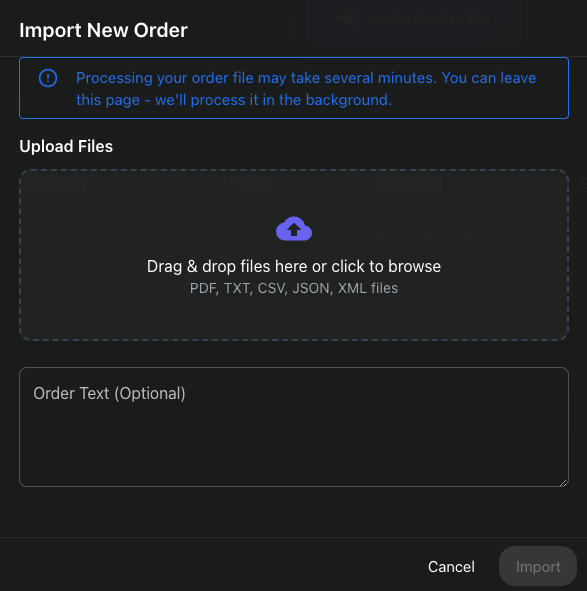
Let Vision parse, match, and convert
Vision uses an open AI model trained on millions of purchase orders to understand and extract key details such as customer, products, quantities, references, and shipping info. In a few minutes you’ll see a digitized order with all known details inside Turis.

Validate and review
Vision automatically validates the order against the rules you set: checking SKUs, pricing, customer information and more. Any mismatches are clearly flagged for review.

Resolve any missing info in a click
If something’s missing—say a buyer reference or a product code—link it once. Vision remembers the association for next time:

Accept the order and move on
You can choose to auto-accept orders if all validation rules are met, or manually accept clean orders at the click of a button. The order will then move on to fulfilment via your Turis integrations to connecting systems.

File formats and requirements
Supported today: PDF, TXT, CSV, XLSX, JSON and plain/HTML emails.
Minimum content needed:
- Customer identification (name, email, number, or another unique marker)
- One or more products (code/SKU or a label we can match)
- Quantities
That’s enough for Vision to create a draft order. The more detail the file has (shipping method, PO number, delivery address), the more Vision will auto‑fill.
Messy input? No problem. Layouts vary wildly; Vision focuses on extracting meaning, not on fixed templates.
Handling gaps and edge cases
If the file is missing a detail (a new buyer contact, a shipping code, or a product alias), Vision prompts you to add or link it. You confirm once, and the next order from that customer gets smoother. No spreadsheet hacks or custom parsers required.
Why this matters for your team
No more copy‑paste. Front‑office and ops can stop retyping data and fixing avoidable mistakes.
Faster confirmations and picks. Orders move from inbox to warehouse faster, without manual bottlenecks.
One pipeline for all orders. Web checkout and file‑based orders end up identical inside Turis. Same rules, same approvals, same audit trail.
A wider customer base. You can work with buyers who can’t switch processes yet—without slowing your business down.
Real price control. See what’s in the order vs. what you’ve agreed with your customer before you accept.
What changes for your buyers
Nothing—unless you want it to. Buyers can keep sending files. You keep delivering quick confirms and on‑time fulfilment. Many will later decide to move to your storefront for even faster ordering; until then, you’re still easy to buy from.
Availability
Vision is ready for you to try straight away. You can request a demo, or if you are already a customer, talk to your Turis contact to enable a trial on your account.
FAQ
“Does this work with any PDF?” Vision works with many common PDF types. Results can vary with very low‑quality scans, but most standard exports are fine.
“What happens after I accept an order?” It behaves like any Turis order—feeds to your ERP, accounting, WMS, and other connected tools as configured.
“Can I control pricing if the file is wrong?” Yes. You’ll see price differences before acceptance and can apply your rules.
“Can I send files to Vision by email?” Yes. With your Turis instance, you will get a unique Vision email address. Your customers can send POs directly there. Or you can forward them when they land in your inbox.
“Do I need to build a template?” No templates needed. Vision focuses on meaning, not rigid layouts.
“How is this different from an ERP add-on or an Enterprise RPA tool?” With Turis Vision, you don’t need a lengthy set up process or to train templates before it works. Vision also provides you with a sales-friendly overview of all orders without needing ERP access or technical know-how.
Is it secure?
Yes. Vision runs on SOC 2–certified infrastructure with strict data isolation and email security standards.
What happens if the ERP sync fails?
Vision retries automatically on temporary errors and flags persistent failures. Orders aren’t lost or duplicated.
Does Vision replace my team?
No. Vision reduces the need to retyping orders into your ERP, so your team can handle exceptions and customer relationship building instead of data entry – maintaining efficiency as order volume grows.